Excellent talk on the features available for protecting your site against XSS.
Thursday, 16 January 2014

Wednesday, 14 August 2013
Productivity Power Tools 2012
One of my favourite extensions in Visual Studio 2012 for the price conscience is Productivity Power Tools 2012.

There are many features which come with Productivity Power Tools 2012 (aka free mini resharper), however one of my favourite features is the new solution wide Remove and Sort.
Remove and Sort is a feature I use constantly on a per class level to remove unwanted using directives and sort them by System first.
Now this can be achieved by right clicking on the solution and then selecting -> remove and sort

Another cool feature is the new Edit Project File as opposed to unload -> edit project file. Quite a minor feature but still worth a mention.
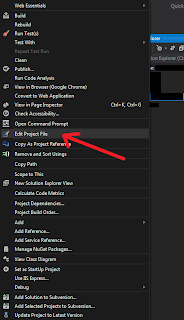

There are many features which come with Productivity Power Tools 2012 (aka free mini resharper), however one of my favourite features is the new solution wide Remove and Sort.
Remove and Sort is a feature I use constantly on a per class level to remove unwanted using directives and sort them by System first.
Now this can be achieved by right clicking on the solution and then selecting -> remove and sort

Another cool feature is the new Edit Project File as opposed to unload -> edit project file. Quite a minor feature but still worth a mention.

Thursday, 18 July 2013
Deploying with Visual Studio 2012 (and Visual Studio 2010)
Publish Profiles
The key to this publish dilemma is Publish Profiles, Using these will change your life forever.
Step 1. - Creating a Publish Profile
These can be created manually but the easiest way is to use the publish wizard in Visual Studio 2012.
Right click on the project you want published and select publish.

You will need to actually publish the project in order for the Publish Profile to be created (that sucks!). Once you've published whether it worked or not there should be a publish profile saved in the properties folder underneath the published project:

Check that in to your source control so that is can be available on the build server.
Step 2. - Automating the deployment
Ok, so now you have to prepare the command line arguments to run against msbuild. The following should be sufficient:
msbuild.exe
/p:publishUrl=LOCATION_OF_WHERE_YOU_WANT_YOUR_STUFF_DEPLOYED
/p:DeployOnBuild=true /p:PublishProfile=NAME_OF_PUBLISH_PROFILE.pubxml
/p:Configuration=Release
//the configuration property can be a custom configuration in order to apply web.config transformations
Notes
The publish profile can be created manually if you are using Visual Studio 2010; as long as the publish profile file is saved in the correct location all should be good.I have tested this against web applications that publish vis FTP and it works fine!
References
- http://sedodream.com/2010/04/26/ConfigTransformationsOutsideOfWebAppBuilds.aspx
- http://www.hanselman.com/blog/TinyHappyFeatures3PublishingImprovementsChainedConfigTransformsAndDeployingASPNETAppsFromTheCommandLine.aspx
- http://sedodream.com/2012/10/27/MSBuildHowToSetTheConfigurationProperty.aspx
- http://sedodream.com/2012/08/19/VisualStudioProjectCompatabilityAndVisualStudioVersion.aspx
- http://stackoverflow.com/questions/13920146/using-msbuild-exe-to-publish-a-asp-net-mvc-4-project-with-the-cmd-line
- http://msdn.microsoft.com/en-us/library/dd465326(VS.100).aspx
- http://www.hanselman.com/blog/SlowCheetahWebconfigTransformationSyntaxNowGeneralizedForAnyXMLConfigurationFile.aspx
- http://stackoverflow.com/questions/8366091/how-do-i-use-web-config-transform-on-my-connection-strings
Tuesday, 28 May 2013
JQuery Brazilian Portuguese DatePicker
JQuery has a lot of plugins and add-ons which allow you to achieve some powerful customisations.
One such plugin is the JQuery localisation feature which allows you to customise the datepicker depending on the local, i.e. the Country and/or Language.
Firstly you need to include the modified JQuery datepicker javascript file with the following name: jquery.ui.datepicker-xx-XX.js, where 'xx-XX' represents the specific culture, e.g. jquery.ui.datepicker-pt-BR.js.
Then inside that jquery.ui.datepicker-pt-BR.js file you need to insert your culture specific translations, Brazilian Portuguese is below:
Use the following code to attach the localised datepicker to a text box.
One such plugin is the JQuery localisation feature which allows you to customise the datepicker depending on the local, i.e. the Country and/or Language.
Firstly you need to include the modified JQuery datepicker javascript file with the following name: jquery.ui.datepicker-xx-XX.js, where 'xx-XX' represents the specific culture, e.g. jquery.ui.datepicker-pt-BR.js.
Then inside that jquery.ui.datepicker-pt-BR.js file you need to insert your culture specific translations, Brazilian Portuguese is below:
jQuery(function ($) {
  $.datepicker.regional['pt-BR'] = {
  closeText: 'Fechar',
  prevText: 'Anter',
  nextText: 'Próx',
  currentText: 'Hoje',
  monthNames: ['Janeiro', 'Fevereiro', 'Março', 'Abril', 'Maio', 'Junho',
  'Julho', 'Agosto', 'Setembro', 'Outubro', 'Novembro', 'Dezembro'],
  monthNamesShort: ['Jan', 'Fev', 'Mar', 'Abr', 'Mai', 'Jun','Jul', 'Ago', 'Set', 'Out', 'Nov', 'Dez'],
  dayNames: ['Domingo', 'Segunda', 'Terça', 'Quarta', 'Quinta', 'Sexta', 'Sábado'],
  dayNamesShort: ['Dom', 'Seg', 'Ter', 'Qua', 'Qui', 'Sex', 'Sáb'],
  dayNamesMin: ['D', 'S', 'T', 'Q', 'Q', 'S', 'S'],
  weekHeader: 'Sem',
  dateFormat: 'dd/mm/yy',
  firstDay: 0,
  isRTL: false,
  showMonthAfterYear: false,
  yearSuffix: ''
 };
});
And reference that file in your script tags:<script src="/Scripts/jquery.ui.datepicker-pt-BR.js" ></script>
Use the following code to attach the localised datepicker to a text box.
<input type="text" name="DateOfBirth" id="DateOfBirth"/>

<script>
  $(function () {
        var culture = 'pt-BR';
        $.datepicker.setDefaults( $.datepicker.regional[ culture ] );
        $("#DateOfBirth").datepicker({
             dateFormat: 'dd/mm/yy',
             yearRange: '1920:2013',
             maxDate: '+0M +0D',
             changeMonth: true,
             changeYear: true
        });
});
</script>
Saturday, 16 February 2013
Working with OAuth 2.0

OAuth 2.0 is a protocol (set of rules) which allows you to access a user's personal information without having to know their user credentials, i.e. username or password.
This is quite significant considering all of the issues surrounding security with user authentication, e.g. SSL, certificates, storage encryption etc.
What this means is you could access a person's Gmail account given just their permission.

[Screen shot taken from https://developers.google.com/oauthplayground/]
There are various processes involved in the OAuth 2.0 protocol, but the most common is the Authorisation Code Grant Flow.
The Authorisation Code Grant Flow allows a program to gain access to a user's personal information by access of a authorisation token.
The process works as follows:
1. The program/application requests an authorisation token from their chosen provider along with what they want to access, e.g. the program might say, "can i please have an authorisation token Google for Billy's Gmail account?"
2. Billy then has to approved that request by simply saying "yes" or "no".
3. Assuming Billy said "yes" then the program/application is issued with an authorisation token from the provider
(Google).
4. The program/application can then exchange this for an access token which is actually what is needed to access Billy's Gmail account. With that token the program/application can then read Billy's Gmail account.
The access token expires about every hour so the program/application will need to make sure that they request a new one!
Here is a link to the OAuth 2.0 Java library I wrote, which should explain the process in a bit more detail :)
Thursday, 20 December 2012
Working with Team Foundation Service
I'm up and running now with Team Foundation Server Service, and I can say that I'm quite impressed.
http://tfs.visualstudio.com/en-us/
I've set up a continuous integration environment at https://mackolicious.visualstudio.com/
Where I've already added two projects
 There's a lot of basic functionality such as, backlog/user story generation, typical agile 'swim lanes' (to-do, in-progress, done), burndown, code/check-in history etc.
My overview (dashboard) looks like this:
There's a lot of basic functionality such as, backlog/user story generation, typical agile 'swim lanes' (to-do, in-progress, done), burndown, code/check-in history etc.
My overview (dashboard) looks like this:
 As you can see by adding in the capacity of the team and the sprint's dates, TFS is able to calculate burndown metrics, cool!
I'm still playing around with the piece of kit! I've already added an application using Eclipse and one using Visual Studio and so far so good.
As you can see by adding in the capacity of the team and the sprint's dates, TFS is able to calculate burndown metrics, cool!
I'm still playing around with the piece of kit! I've already added an application using Eclipse and one using Visual Studio and so far so good.


Sunday, 25 November 2012
Release Management and Release Processes
In my experience as a developer I have observed various release processes that are used to get code to production.
In my opinion the most effective and efficient release process within an Agile environment is one that is automated and is controlled by either a QA (Quality Assurance) Tester or a PO (Product Owner). Both these individuals have a strong understand of the acceptance criteria and customer requirements, hence they would be best suited to deploy a piece of code to production.
I believe the entire process should be automated including rollbacks and configuration changes and should be as seamless as just clicking a button.
The steps should be as follows:
1. Developer finishes work and deploys to a test environment
2. QA signs off work according to COA (conditions of acceptance) and deploys to an intermediate environment, e.g. hidden live, stage (whatever)
3. The QA and PO then review the work again on the intermediate environment and deploy directly to production
That entire process could take less than an hour! Meaning work developed at the start of the day could be in production by the end :)
In my opinion the most effective and efficient release process within an Agile environment is one that is automated and is controlled by either a QA (Quality Assurance) Tester or a PO (Product Owner). Both these individuals have a strong understand of the acceptance criteria and customer requirements, hence they would be best suited to deploy a piece of code to production.
I believe the entire process should be automated including rollbacks and configuration changes and should be as seamless as just clicking a button.
The steps should be as follows:
1. Developer finishes work and deploys to a test environment
2. QA signs off work according to COA (conditions of acceptance) and deploys to an intermediate environment, e.g. hidden live, stage (whatever)
3. The QA and PO then review the work again on the intermediate environment and deploy directly to production
That entire process could take less than an hour! Meaning work developed at the start of the day could be in production by the end :)
Friday, 28 September 2012
System.IO.FileNotFoundException: Could not load file or assembly 'Missing.Assembly.dll, Version=1.0.20.15800, Culture=neutral, PublicKeyToken=null' or one of its dependencies. The system cannot find the file specified
Have you ever seen a error like the one below:
System.IO.FileNotFoundException: Could not load file or assembly 'Missing.Assembly.dll, Version=1.0.20.15800, Culture=neutral, PublicKeyToken=null' or one of its dependencies. The system cannot find the file specified
The first thing to think is Ahhhhhhh! I have all the references what is going on??!
Don't panic here's a few steps to diagnosing this issue, and hopefully resolving it.
STEP 1. Make sure you can debug the code and ascertain which assembly is throwing the exception.
STEP 2. Once you know which assembly is complaining about the missing DLL you then need to find the corresponding project and check that project's references:
 If the reference that is in the exception exists then move on to STEP 3.
STEP 3. If the reference exists then you need to look a little deeper, into the second part of the exception or one of its dependencies. This is key, what this means is that Missing.Assembly.dll is referencing an assembly you're not (FACT).
What you need to do is ascertain exactly which assembly it is referencing and which version it is referencing. This is actually quite tricky for large projects but the easiest way to find out is by looking at where the exception occured (i.e. the line of code) and what that particular piece of code needs to work in terms of references.
Do this by looking at the using statements:
If the reference that is in the exception exists then move on to STEP 3.
STEP 3. If the reference exists then you need to look a little deeper, into the second part of the exception or one of its dependencies. This is key, what this means is that Missing.Assembly.dll is referencing an assembly you're not (FACT).
What you need to do is ascertain exactly which assembly it is referencing and which version it is referencing. This is actually quite tricky for large projects but the easiest way to find out is by looking at where the exception occured (i.e. the line of code) and what that particular piece of code needs to work in terms of references.
Do this by looking at the using statements:
 Good luck :)
Any questions?
Good luck :)
Any questions?


Monday, 27 August 2012
Upgrading to Windows 8
Bonjour Amigos,
Just upgraded to Windows 8 Pro on the following machine: (Just look at the spec)
 It was a very seamless and easy installing, however my version of Kaspersky had to be un-installed as it was not compatible with Windows 8, apart from that everything else worked fine.
At first it was difficult to use as navigating around the desktop (app) without a start icon is confusing...
It was a very seamless and easy installing, however my version of Kaspersky had to be un-installed as it was not compatible with Windows 8, apart from that everything else worked fine.
At first it was difficult to use as navigating around the desktop (app) without a start icon is confusing...
 Whenever you press the start key you are redirected to the new Windows start screen! It can be quite confusing at first but intuitive minds can get used to it quickly.
For example, if you wanted to search for an application or file, you carry out the same action you would on Windows 7 START + "app name", however it looks completely different:
Whenever you press the start key you are redirected to the new Windows start screen! It can be quite confusing at first but intuitive minds can get used to it quickly.
For example, if you wanted to search for an application or file, you carry out the same action you would on Windows 7 START + "app name", however it looks completely different:
 This concludes my analysis for upgrading to Windows 8, just to summarise I would recommend upgrading!


Monday, 2 July 2012
Using ADO.NET to connect to a custom DB provider
Using ADO.NET is a great way to connect to data provider that exists outside the .NET framework to connect to a database. There are many data providers out there, MySQL,PostgreSQL, FlySpeed etc. which are in commercial use but are not neccesaraly that popular. It can be difficult sometimes create a DAL for a custom database architecture. Fortunately we have ADO.NET along with DbProviderFactory class which allows any custom DB provider to connect to the .NET CLR and allow developers to write custom execution queries against the database. When using these custom DB providers you need to update your application configuration file so that the .NET runtime has knowledge of the DbProviderFactory that you intend on using, if you check your machine.config (C:\WINDOWS\Microsoft.NET\Framework\v4.0.30319\Config) for .NET v4.0 you'll should see the following entries:
These are the default factories that cone with the .NET framework, however if you want to introduce your own custom factory you can just add an entry. Depending on whether you want your factory to be available across applications or not you could add the entry to your local application/web configuration file.
<section name="system.data" type="System.Data.Common.DbProviderFactoriesConfigurationHandler, System.Data, Version=4.0.0.0, Culture=neutral, PublicKeyToken=b77a5c561934e089" />
<DbProviderFactories>
     <add name="Microsoft SQL Server Compact Data Provider" invariant="System.Data.SqlServerCe.3.5" description=".NET Framework Data Provider for Microsoft SQL Server Compact" type="System.Data.SqlServerCe.SqlCeProviderFactory, System.Data.SqlServerCe, Version=3.5.0.0, Culture=neutral, PublicKeyToken=89845dcd8080cc91" />

    <add name="Microsoft SQL Server Compact Data Provider 4.0" invariant="System.Data.SqlServerCe.4.0" description=".NET Framework Data Provider for Microsoft SQL Server Compact" type="System.Data.SqlServerCe.SqlCeProviderFactory, System.Data.SqlServerCe, Version=4.0.0.0, Culture=neutral, PublicKeyToken=89845dcd8080cc91" />

    <add name="MySQL Data Provider" invariant="MySql.Data.MySqlClient" description=".Net Framework Data Provider for MySQL" type="MySql.Data.MySqlClient.MySqlClientFactory, MySql.Data, Version=6.3.6.0, Culture=neutral, PublicKeyToken=c5687fc88969c44d" />
</DbProviderFactories>
These are the default factories that cone with the .NET framework, however if you want to introduce your own custom factory you can just add an entry. Depending on whether you want your factory to be available across applications or not you could add the entry to your local application/web configuration file.
Wednesday, 9 May 2012
JSONP aka JSON with PADDING
JSONP is a hack pattern which allows JavaScript from one domain to execute with JavaScript from another domain. This is technically not allowed as it violates cross-domain polcy, howeber throught the JSO work-aroud it can be acieved.
"Why?" I hear you ask, well the answer is simple, someone exposes a service on one machine and you want to consume that service on another. "But that's already possible!" you cry, well yes however you can't execute that service inline, look at the following example:
On my.domain.com you have a local script called myscript.js, so the full URL to that script is my.domain.com/myscript.js. Inside this script you want to make a call to other.domain2.com/their.js and execute their JavaScript, it doesn't work, unless you explicitly ue the <script> tags. But that's pointless because you want to execute their inline with yours; that's where JSONP comes in.
Using JSONP you are able to overcome this hurdle by setting up an 'understanding' between the service and the requesting JavaScript. This can be achieved by placing a query string parameter in the URL that the service understands, e.g. other.domain.com/their.js?jsonp=yes. The service will 'wrap' it's response in a JavaScript function, which the requesting JavaScript will execute once it's received the request. Once it executes this request, it will hopefully get some meaningful JSON that it can interpret and use for it's own devices.
Tuesday, 10 April 2012
ASP.NET Web API (Beta)
I have been recently looking into the new ASP.NET Web API to find out what features it offers and it's quite interesting.
It seems to following a convention over code model similar to that of ASP.NET MVC, so for those familiar with those constructs it should be an easy API to follow.
You use the global.asax.cs file to name your routes (just like ASP.NET MVC), however you use the MapHttpRoute overload instead e.g.
routes.MapHttpRoute(
name: "DefaultApi",
routeTemplate: "{controller}/notifications"
);
This is a typical route where the {controller} template representes the controller name that is found beneath the controllers folder.
Wednesday, 11 January 2012
Using Modinizer
Modinizer is a great new javascript library for detecting browser features without having to write too much unnecessary code for abstracting cross-browser compatibilities.
For example rounded corners is a feature that was desired for many UX (user experience) developers and before CSS3 could only be accomplished with javascript hackery. Now with modinizer it is possible to detect using the library whether the feature is enabled and code corresponding classes appropriately.
When modinizer is included on a page it dynamically updates the HTML class attribute with a set of classes that identify what that browser understands, e.g. multiplebgs = multiple backgrounds, or no-multiplebgs meaning doesn't support multiple backgrounds. Allowing you the developer to code accordingly for both scenarios and thus future proof your web application.
The same also applies to new HTML5 elements such as video, and localstorage. A quick Modiziner.localStorage test will reveal whether or not the browser supports that.
Tuesday, 10 January 2012
Reading Files Across Servers
There are many ways to access data across servers that are shared on the same network. Depending on your setup will determine what is the best approach. It is possible to use the COM model to access the UNC as and authenticated user of that machine, i.e. machine name = CPU123, user = CPU123\user.whoever.
The problem with this is approach is that if your servers are on different domains then is will be a huge headache to maintain all of those users, configuration file sounds like the best approach, but that will still yield a huge file. One app setting for each user.
The approach I adopted was to use MSMQ and created a WCF service for sending messages to that queue and reading the state of the particular file using a FileWatcher.
Worked well!
Saturday, 15 October 2011
Using NCover with Cruise Control.NET and Nant
I had the task of integrating NCover into our continuous builds and integration.
At the time I was using Cruise Control.NET v 1.5, NCover v 3.4.18 (classic), and Nant v0.91.
I came across several problems when doing this, however I finally came across a solution where by using Nant I was able to build my application, run my Nunit tests and the run my coverage.
The route I took involved using the NCover Nant task DLL that comes with NCover and running it over my tests.
The issue which held me up the longest was the fact that in order to run coverage over your test DLLs you need to ensure that you include the pdb symbols in your build output, otherwise you'll be going nuts!
Sunday, 9 October 2011
IOC - Inversion of Control
Currently, I'm using Inversion of Control (IOC) for most of my application building which I'm finding really useful and quite powerful.
Some people consider IOC to be a pattern which follows the three R's: Register, Resolve and Release which is how you would use it by default.
IOC usually takes some kind of container which holds all the mappings between objects, for example, if you wanted to use the class Chicken everytime you referenced the interface IAnimal then in you container you may have the following registration:
_container.Register.To();
The syntax depends on which IOC library you are using; there are several.
My current preferred choice of IOC library is Castle Windsor, which makes using IOC inside applications quite fun and simple.
Sunday, 10 July 2011
ASP.NET MVC
Hi all, I'm back after a long time off. What I would like to discuss is ASP.NET MVC in comparison to ASP.NET.
Let’s give a quick introduction ASP.NET (Active Server Pages) is a server side coding language used for rendering HTML (Hyper-Text Markup Language). This is achieved by using the notoriously infamous server tags <% code goes here %>.
The ASP.NET runtime was built as an abstraction to allow developers to code in their native .Net languages, e.g. C# to create powerful web applications. The problem (amongst other things) was that the level of abstraction meant that coding “simple straight-forward” applications was quite easy and efficient, however coding custom or complex applications became quite difficult, e.g. two form tags on the same page.
The main problem was that through this level of abstraction some granular control was taken away from the developer in order to have a windows forms style development experience. Even controlling Ids on a particular HTML element became quite a laborious and painful task.
With ASP.NET version 4.0 some vast improvements had been introduced to make most coding scenarios easier, however with the revolution of test driven development, the improvements (in my opinion) still weren’t enough – introducing ASP.NET MVC.
MVC (Model View Controller) for those who do no t know is a design pattern used throughout all kinds of programming languages. It essentially boils down to one primary concept “separation of concerts”, meaning everyone has a job and they should only be concerned with fulfilling the requirements of their job. Fox example, in a typical restaurant theirs a chef, a waiter, and a manager. It’s not chef’s responsibility to take your jackets and make sure your comfortable in your seat, just like it’s not the waiter’s responsibility to ensure that the restaurant’s targets are met and that everyone shows up to work on time.
The MVC design pattern has been so successful in coding web applications that Microsoft and the ASP.NET team decided to introduce their own implementation. What this means is that we now have a design pattern directly “embedded” into the .NET framework, and used correctly can lead to power web applications as with ASP.NET but also powerful unit testing. ASP.NET MVC gives some of the control back to the developer and allows you to deepen your understanding of ASP.NET runtime.
With ASP.NET MVC 3.0 there is a new syntax introduced for creating ASPX pages called Razor. It is what I would describe as very clean and concise. The reason being that a lot of the repetitive tags and directives are no longer needed and writing C# inline with HTML (or even JavaScript) looks a lot nicer to read! Which for some developers such as myself is very important. What this means that less keystrokes are now required to produce the same content with ASP.NET thus allowing the developer to get on with other important tasks, such as, poking people of Facebook.
Let’s give a quick introduction ASP.NET (Active Server Pages) is a server side coding language used for rendering HTML (Hyper-Text Markup Language). This is achieved by using the notoriously infamous server tags <% code goes here %>.
The ASP.NET runtime was built as an abstraction to allow developers to code in their native .Net languages, e.g. C# to create powerful web applications. The problem (amongst other things) was that the level of abstraction meant that coding “simple straight-forward” applications was quite easy and efficient, however coding custom or complex applications became quite difficult, e.g. two form tags on the same page.
The main problem was that through this level of abstraction some granular control was taken away from the developer in order to have a windows forms style development experience. Even controlling Ids on a particular HTML element became quite a laborious and painful task.
With ASP.NET version 4.0 some vast improvements had been introduced to make most coding scenarios easier, however with the revolution of test driven development, the improvements (in my opinion) still weren’t enough – introducing ASP.NET MVC.
MVC (Model View Controller) for those who do no t know is a design pattern used throughout all kinds of programming languages. It essentially boils down to one primary concept “separation of concerts”, meaning everyone has a job and they should only be concerned with fulfilling the requirements of their job. Fox example, in a typical restaurant theirs a chef, a waiter, and a manager. It’s not chef’s responsibility to take your jackets and make sure your comfortable in your seat, just like it’s not the waiter’s responsibility to ensure that the restaurant’s targets are met and that everyone shows up to work on time.
The MVC design pattern has been so successful in coding web applications that Microsoft and the ASP.NET team decided to introduce their own implementation. What this means is that we now have a design pattern directly “embedded” into the .NET framework, and used correctly can lead to power web applications as with ASP.NET but also powerful unit testing. ASP.NET MVC gives some of the control back to the developer and allows you to deepen your understanding of ASP.NET runtime.
With ASP.NET MVC 3.0 there is a new syntax introduced for creating ASPX pages called Razor. It is what I would describe as very clean and concise. The reason being that a lot of the repetitive tags and directives are no longer needed and writing C# inline with HTML (or even JavaScript) looks a lot nicer to read! Which for some developers such as myself is very important. What this means that less keystrokes are now required to produce the same content with ASP.NET thus allowing the developer to get on with other important tasks, such as, poking people of Facebook.
Friday, 18 September 2009
Extensions, extensions
Once again the .Net framework has brought out another fantastic feature which makes development smarter and easier.
Extensions are a very simple but very useful feature in .Net. so what are they? They are methods which extend the functionality of an existing object, what this means is that you the developer can add a method to any object (as far as I know!). For example, if we look at the boring String class we see methods such as Contains(), EndsWith(), Join(), LastIndexOf(), ToLower(), Trim() and many more! However what about the ConvertToMackolicious() method!!? It doesn’t exists! So everytime I want to convert a string to “Mackolicious“ I either have to create a private method or create a class.
The disadvantages, if I had 50 classes that required this functionality I would need at least 50 private methods! That’s dumb! So naturally I would create a class right, but every time my application gets compiled so would the class thus creating an unnecessary object in memory, boooo.
Welcome extensions! Now I can write a static method within a static class and provide a certain method signature and can achieve a functionality which is identical to the functionality of a regular instance method, such as those examples above.
This is an example of the syntax required for an extension method: public static string ConvertToMackolicious(this String stringObject){}. Using the keyword ‘this’ tells the runtime what object you are extending, here I’m extending a string, hence all strings within this scope (namespace) will be able to benefit from the ConvertToMackolicious() method yippee!
Disadvantages of extension methods (from my personal experience). Acting on an object within the .Net framework is easy and produces good results, however acting on a type built by yourself or someone else may not always be a good idea. The reason being that they might one day change the implementation of that type making your extended method produce wrong results or make it stop working altogether! Be careful!
Extensions are a very simple but very useful feature in .Net. so what are they? They are methods which extend the functionality of an existing object, what this means is that you the developer can add a method to any object (as far as I know!). For example, if we look at the boring String class we see methods such as Contains(), EndsWith(), Join(), LastIndexOf(), ToLower(), Trim() and many more! However what about the ConvertToMackolicious() method!!? It doesn’t exists! So everytime I want to convert a string to “Mackolicious“ I either have to create a private method or create a class.
The disadvantages, if I had 50 classes that required this functionality I would need at least 50 private methods! That’s dumb! So naturally I would create a class right, but every time my application gets compiled so would the class thus creating an unnecessary object in memory, boooo.
Welcome extensions! Now I can write a static method within a static class and provide a certain method signature and can achieve a functionality which is identical to the functionality of a regular instance method, such as those examples above.
This is an example of the syntax required for an extension method: public static string ConvertToMackolicious(this String stringObject){}. Using the keyword ‘this’ tells the runtime what object you are extending, here I’m extending a string, hence all strings within this scope (namespace) will be able to benefit from the ConvertToMackolicious() method yippee!
Disadvantages of extension methods (from my personal experience). Acting on an object within the .Net framework is easy and produces good results, however acting on a type built by yourself or someone else may not always be a good idea. The reason being that they might one day change the implementation of that type making your extended method produce wrong results or make it stop working altogether! Be careful!
Sunday, 30 August 2009
Windows Workflow Foundation
During my research into Windows Workflow Foundation I discovered many things, the most important discoverey of all was the actual reason for using it. This was probably the most difficult aspect of my research, but after hours of heading banging and implementation I found several good reasons for using Windows Workflow Foundation (WF).
Image a scenario where you have been given the developement task of building a specific aspect of an application. Here you are responsible for only one part and other members of the team are responsible for the other aspects, for example, you have been told to build a function that takes text and determines whether or not the word "Microsoft" appeared within the text. So most likely you build your simple application which uses a regular expression (of some kind) and returns some kind of boolean.
Now what happens to that boolean that is return you have no idea, nor do you know where the text comes from. All you know is that your function works! Now the project manager has thanked you for your working function and has reveiled to you how integral your function is to the company's applications. In fact he has told you that several existing applications and several new ones will be using your function in order to determine some kind of process, for example, one application may use your function to send emails to every address where "Microsoft" is in the domain.
Achieving this portability can be done in many ways, however using WF it can be achieved in a strongly-typed diagrammtic way. All this means is that you can view the various execution processes whislt it being tied into the code. Before this had to be done seperately with the business processes being dis-connected from the code, with WF however, this business logic achieved through a UML designer is built into to the .NET framework allowing true business logic to be programmed directly into the application logic.
So to go back to the inital problem, a team-lead or manager can easily integrate other applications or remove exisiting applications by using the WF. He can also ensure that your function is doing what its supposed to be doing by simpliy integratin unit tests and making sure that the application exits correctly!
Perfect, problem solved you work on your existing code whislt it gets integrated seemlessly with everything else!!
Image a scenario where you have been given the developement task of building a specific aspect of an application. Here you are responsible for only one part and other members of the team are responsible for the other aspects, for example, you have been told to build a function that takes text and determines whether or not the word "Microsoft" appeared within the text. So most likely you build your simple application which uses a regular expression (of some kind) and returns some kind of boolean.
Now what happens to that boolean that is return you have no idea, nor do you know where the text comes from. All you know is that your function works! Now the project manager has thanked you for your working function and has reveiled to you how integral your function is to the company's applications. In fact he has told you that several existing applications and several new ones will be using your function in order to determine some kind of process, for example, one application may use your function to send emails to every address where "Microsoft" is in the domain.
Achieving this portability can be done in many ways, however using WF it can be achieved in a strongly-typed diagrammtic way. All this means is that you can view the various execution processes whislt it being tied into the code. Before this had to be done seperately with the business processes being dis-connected from the code, with WF however, this business logic achieved through a UML designer is built into to the .NET framework allowing true business logic to be programmed directly into the application logic.
So to go back to the inital problem, a team-lead or manager can easily integrate other applications or remove exisiting applications by using the WF. He can also ensure that your function is doing what its supposed to be doing by simpliy integratin unit tests and making sure that the application exits correctly!
Perfect, problem solved you work on your existing code whislt it gets integrated seemlessly with everything else!!
Subscribe to:
Posts (Atom)